Network

7:08 PM
Install SSDT in visual studio 2015-Error 0x80070002: Failed to send request to URL: https://go.microsoft.com/fwlink/?LinkId=817280&clcid=0x409
Posted by vijay
Hi All,
Here i have tried to install SSDT in Visual studio 2015 through online.But am not able to make it success.Everytime it has thrown below error at the some point, then i have tried various method to fix this issue but nothing get helped.
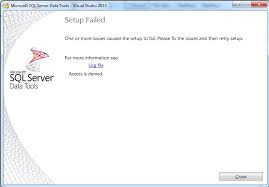
Finally i have found solution form the below link.Here you can download standalone installer for SSDT.After i tried this SSDT has installed Successfully.
https://docs.microsoft.com/en-us/previous-versions/mt186501(v=msdn.10)?redirectedfrom=MSDN
Direct Link to Download the file.
https://go.microsoft.com/fwlink/?linkid=832313&clcid=0x409
Here i have tried to install SSDT in Visual studio 2015 through online.But am not able to make it success.Everytime it has thrown below error at the some point, then i have tried various method to fix this issue but nothing get helped.
Finally i have found solution form the below link.Here you can download standalone installer for SSDT.After i tried this SSDT has installed Successfully.
https://docs.microsoft.com/en-us/previous-versions/mt186501(v=msdn.10)?redirectedfrom=MSDN
Direct Link to Download the file.
https://go.microsoft.com/fwlink/?linkid=832313&clcid=0x409
Hi All,
i have got this error while doing custom object detection in tensorflow.
Here the solution which i found
It occurs due to Tensorflow version
If it is TF2.0 then you need to replace with
Change the import tensorflow keyword
Correct One:
i have got this error while doing custom object detection in tensorflow.
Here the solution which i found
It occurs due to Tensorflow version
If it is TF2.0 then you need to replace with
tf.compat.v1.flagsChange the import tensorflow keyword
Correct One:
import tensorflow.compat.v1 as tf
Hi All,
i have got this error while doing custom object detection in tensorflow.
Here the solution which i found
step 1:
First you need to go to this path in the command prompt..
....(local path)/tensorflow_models/models/slim
Step 2:
if you have Build file in the folder then delete the file
Step 3:
Type Setup.py and press enter
Now its start the installation.Issue will be solved.
i have got this error while doing custom object detection in tensorflow.
Here the solution which i found
step 1:
First you need to go to this path in the command prompt..
....(local path)/tensorflow_models/models/slim
Step 2:
if you have Build file in the folder then delete the file
Step 3:
Type Setup.py and press enter
Now its start the installation.Issue will be solved.
Table-valued parameters are declared by using user-defined table types. You can use table-valued parameters to send multiple rows of data to a Transact-SQL statement or a routine, such as a stored procedure or function, without creating a temporary table or many parameters.
Advantage:
Advantage:
- Do not acquire locks for the initial population of data from a client.
- Provide a simple programming model.
- Enable you to include complex business logic in a single routine.
- Reduce round trips to the server.
- Can have a table structure of different cardinality.
- Are strongly typed.
- Enable the client to specify sort order and unique keys.
- Are cached like a temp table when used in a stored procedure. Starting with SQL Server 2012, table-valued parameters are also cached for parameterized queries.
Disadvantage:
- SQL Server does not maintain statistics on columns of table-valued parameters.
- Table-valued parameters must be passed as input READONLY parameters to Transact-SQL routines. You cannot perform DML operations such as UPDATE, DELETE, or INSERT on a table-valued parameter in the body of a routine.
- You cannot use a table-valued parameter as target of a SELECT INTO or INSERT EXEC statement. A table-valued parameter can be in the FROM clause of SELECT INTO or in the INSERT EXEC string or stored procedure.
- Compared to bulk operations that have a greater startup cost than table-valued parameters, table-valued parameters perform well for inserting less than 1000 rows.
Code:
/* Create a table type. */
CREATE TYPE LocationTableType AS TABLE
( LocationName VARCHAR(50)
, CostRate INT );
GO
/* Create a procedure to receive data for the table-valued parameter. */
CREATE PROCEDURE dbo. usp_InsertProductionLocation
@TVP LocationTableType READONLY
AS
SET NOCOUNT ON
INSERT INTO AdventureWorks2012.Production.Location
(Name
,CostRate
,Availability
,ModifiedDate)
SELECT *, 0, GETDATE()
FROM @TVP;
GO
/* Declare a variable that references the type. */
DECLARE @LocationTVP AS LocationTableType;
/* Add data to the table variable. */
INSERT INTO @LocationTVP (LocationName, CostRate)
SELECT Name, 0.00
FROM AdventureWorks2012.Person.StateProvince;
/* Pass the table variable data to a stored procedure. */
EXEC usp_InsertProductionLocation @LocationTVP;
GO
If you have a datetime column in a WHERE clause, and you need to convert it or use a data function, try to push the function to the literal expression.
For the below two query , the First one take more query cost rather than the Second one,
SELECT OrderID FROM dbo.Orders WHERE DATEADD(day, 15,
OrderDate) = '07/23/1996'
SELECT OrderID FROM Orders WHERE OrderDate = DATEADD(day,
-15, '07/23/1996')
In below Figure you can check the query cost

For the below two query , the First one take more query cost rather than the Second one,
SELECT OrderID FROM dbo.Orders WHERE DATEADD(day, 15,
OrderDate) = '07/23/1996'
SELECT OrderID FROM Orders WHERE OrderDate = DATEADD(day,
-15, '07/23/1996')
In below Figure you can check the query cost

Here below code, which describes to create Dynamic Pivot view from the Table.
Create table yourtable (itemID INT, part CHAR(1))
INSERT INTO yourtable VALUES(1,'A'),(1,'B'),(2,'A'),(2,'A'),(2,'A'),(3,'C')
DECLARE @colsSorted AS NVARCHAR(2000), @sql AS NVARCHAR(4000)
select @colsSorted = STUFF((select DISTINCT ', '
+ quotename( Cast(ROW_NUMBER() OVER(PARTITION BY itemID ORDER BY part) as varchar(3)) ,']')
FROM yourtable
FOR XML PATH (''),type).value('.','varchar(max)'), 1, 2, '')
--Print @colsSorted
Set @sql=N' if object_id(''anewtable'',''U'') is not null drop table anewtable ; with mycte as (SELECT ItemID, '+ @colsSorted + ' FROM (
Select ItemID,Part, Cast(ROW_NUMBER() OVER(PARTITION BY itemID ORDER BY part) as varchar(3)) as Cols
FROM yourtable
) src
PIVOT (Max(part) for Cols IN ('+ @colsSorted +')) pvt )
Select * into aNewtable
from mycte;'
--print @sql
exec sp_executesql @sql;
select * from aNewtable
select * from yourtable
drop table yourtable
Happy coding!!!!!!!!!!!!!!!!!!
Create table yourtable (itemID INT, part CHAR(1))
INSERT INTO yourtable VALUES(1,'A'),(1,'B'),(2,'A'),(2,'A'),(2,'A'),(3,'C')
DECLARE @colsSorted AS NVARCHAR(2000), @sql AS NVARCHAR(4000)
select @colsSorted = STUFF((select DISTINCT ', '
+ quotename( Cast(ROW_NUMBER() OVER(PARTITION BY itemID ORDER BY part) as varchar(3)) ,']')
FROM yourtable
FOR XML PATH (''),type).value('.','varchar(max)'), 1, 2, '')
--Print @colsSorted
Set @sql=N' if object_id(''anewtable'',''U'') is not null drop table anewtable ; with mycte as (SELECT ItemID, '+ @colsSorted + ' FROM (
Select ItemID,Part, Cast(ROW_NUMBER() OVER(PARTITION BY itemID ORDER BY part) as varchar(3)) as Cols
FROM yourtable
) src
PIVOT (Max(part) for Cols IN ('+ @colsSorted +')) pvt )
Select * into aNewtable
from mycte;'
--print @sql
exec sp_executesql @sql;
select * from aNewtable
select * from yourtable
drop table yourtable
Happy coding!!!!!!!!!!!!!!!!!!
3:03 AM
Office has detected a problem with this file. To help protect your computer this file cannot be opened.
Posted by vijay
Hi,
If you got this below error on your code,
Office has detected a problem with this file. To help protect your computer this file cannot be opened.
Here you can find the solution to avoid such errors.
Just add this below line when you are initializing excel application.
if you set it to
If you got this below error on your code,
Office has detected a problem with this file. To help protect your computer this file cannot be opened.
Here you can find the solution to avoid such errors.
Just add this below line when you are initializing excel application.
if you set it to
msoFileValidationSkip before the Open statement, it should bypass the file protection check.excelApp.FileValidation = MsoFileValidationMode.msoFileValidationSkip;
Here you can find the value from HTML control to code behind using ASP.net
if you still want to get or set values to HTML controls without runat="server" then you can use Request.Form collection to get the value. You can use public property and embedded code blocks to set the value from server. Refer the code below,
ASPX
<input id="txt1" name="txt1" type="text" value="Set in Client Side" />
<input id="txt2" name="txt2" type="text" value="<% =ServerValue %>" />
CodeBehind
public string ServerValue = String.Empty;
protected void btnSave_Click(object sender, EventArgs e)
{
string ClientValue = Request.Form["txt1"];
ServerValue = "Set in Server";
}
}
Please like .....
if you still want to get or set values to HTML controls without runat="server" then you can use Request.Form collection to get the value. You can use public property and embedded code blocks to set the value from server. Refer the code below,
ASPX
<input id="txt1" name="txt1" type="text" value="Set in Client Side" />
<input id="txt2" name="txt2" type="text" value="<% =ServerValue %>" />
CodeBehind
public string ServerValue = String.Empty;
protected void btnSave_Click(object sender, EventArgs e)
{
string ClientValue = Request.Form["txt1"];
ServerValue = "Set in Server";
}
}
i would like to share the code to zip and unzip a file without using any opensource which is directly used reference file in dot net framework.
Please add the reference file to ZipFile is contained in the assembly System.IO.Compression.FileSystem.

Please add the reference file to ZipFile is contained in the assembly System.IO.Compression.FileSystem.
To zip a file System.IO.Compression.ZipFile.CreateFromDirectory(startPath, zipPath);
To UnZip a File System.IO.Compression.ZipFile.ExtractToDirectory(startPath, extractPath);he reference file to ZipFile is contained in the assembly System.IO.Compression.FileSystem.
Got a question a while back from a customer asking how to enable ASP.NET pages with custom file extensions, so I played around a bit to see how to do it, and here’s what I came up with:
1. Open up the IIS 5.1 or 6 management console, and navigate to the virtual directory (or web site) that you want to configure. Right-click the folder and select Properties.
2. On the Directory (or Web Site) tab, click the Configuration button.
3. On the Mappings tab, click Add, and enter aspnet_isapi.dll (the path is under Windows\Microsoft.net\Framework\<version>\…check the existing mapping for .aspx if you need the exact path) as the Executable, and your desired extension under Extension (I used .foo). Clear the “Check that file exists” box. Click OK (if OK is greyed out, tab around in the textboxes a bit, that usually seems to clear the issue that prevents it from being active). Click OK.
4. In your web.config file (or the main web.config for the machine, if you want this to apply to all sites), add the following HttpHandler mapping (inside the <system.web> tags:
<httpHandlers>
<add path=”*.foo” verb=”*” type=”System.Web.UI.PageHandlerFactory” validate=”true” />
</httpHandlers>
5. Also in your web.config, add the following Build Provider mapping (goes between the <compilation> tags, you may need to edit the default tag, since in ASP.NET 2.0 it defaults to a self-closing tag):
<buildProviders>
<add extension=”.foo” type=”System.Web.Compilation.PageBuildProvider” />
</buildProviders>
The complete <compilation tag should look similar to the following:
<compilation debug=”false” strict=”false” explicit=”true”>
<buildProviders>
<add extension=”.foo” type=”System.Web.Compilation.PageBuildProvider” />
</buildProviders>
</compilation>
6. Add a new web form to the page (probably easiest to stick with single file pages for this), add controls, etc., and when you’re finished with the page, rename the extension to the one you configured in IIS.
7. Browse with IIS to test.
- On the computer that requires the connection string, create a new file with a file extension of .udl.
- To perform this task, you will have to be viewing file extensions. If you are unsure how to do that, seeHow To: View File Name Extensions.
- Create a new text file and then rename the three letter file extension .txt to .udl.
- For example, if you create a file named ConnectionString.txt, just rename it to ConnectionString.udl.
- The rest of these steps will assume that the file is actually named ConnectionString.udl. If you created another file name with a .udl file extension, that is fine, just substitute the appropriate name as needed in the following instructions.
- Right-click ConnectionString.udl that you just created and then click Properties.
- On the Connection tab, fill out the connection properties according to the server, authentication type, and database name that you need. This is typically something you would already know, but if you do not, you may have to contact the database administrator or go look at the database connection properties yourself. If you need help with that, check out the Server Management How To Pages .
- Click Test Connection. Hopefully it will succeed. If not, check the credentials, authentication type, and any firewalls (How to: Configure a Windows Firewall for Database Engine Access ) between servers.
- Click OK.
- Open the url file and inside you will find the connection string. For example, Provider=SQLOLEDB.1;Integrated Security=SSPI;Persist Security Info=False;InitialCatalog=FIMCertificateManagement;Data Source=FIMDC1 (as shown in the following figure).
- Remove Provider portion of the string. Using the example above, the connection string for the application would be: Integrated Security=SSPI;Persist Security Info=False;InitialCatalog=FIMCertificateManagement;Data Source=FIMDC1


| Non-Unicode | Unicode |
| (char, varchar, text) | (nchar, nvarchar, ntext) |
| Stores data in fixed or variable length | Same as non-Unicode |
| char: data is padded with blanks to fill the field size. For example, if a char(10) field contains 5 characters the system will pad it with 5 blanks | nchar: same as char |
| varchar: stores actual value and does not pad with blanks | nvarchar: same as varchar |
| requires 1 byte of storage | requires 2 bytes of storage |
| char and varchar: can store up to 8000 characters | nchar and nvarchar: can store up to 4000 characters |
| Best suited for US English: "One problem with data types that use 1 byte to encode each character is that the data type can only represent 256 different characters. This forces multiple encoding specifications (or code pages) for different alphabets such as European alphabets, which are relatively small. It is also impossible to handle systems such as the Japanese Kanji or Korean Hangul alphabets that have thousands of characters."1 | Best suited for systems that need to support at least one foreign language: "The Unicode specification defines a single encoding scheme for most characters widely used in businesses around the world. All computers consistently translate the bit patterns in Unicode data into characters using the single Unicode specification. This ensures that the same bit pattern is always converted to the same character on all computers. Data can be freely transferred from one database or computer to another without concern that the receiving system will translate the bit patterns into characters incorrectly. |
i would like to share the different ways to earn money through online.There are many ways to work through online.Here i share method those who are ready to write content articles.
If you are good writers then don't sit idle,its time to get popularize yourself through tech world.

Recently i found the site by posting content and your own URl links to popularize your blog or site.
Already they are many sites doing certain type of work www.vdsite.com is the Indian site.they ready to popularize your writing skills and you blog site.
Thing you have to do add your article or blog site URl to earn points from this site to improve your user level.
Site address www.vdsite.com
If you are good writers then don't sit idle,its time to get popularize yourself through tech world.
Recently i found the site by posting content and your own URl links to popularize your blog or site.
Already they are many sites doing certain type of work www.vdsite.com is the Indian site.they ready to popularize your writing skills and you blog site.
Thing you have to do add your article or blog site URl to earn points from this site to improve your user level.
Site address www.vdsite.com
Refer the below link............
http://vdsite.com/Articles/241/how-to-show-popup-window-from-user-when-leaving-from-page-in-asp.net
Refer the below inks...........

http://vdsite.com/Articles/203/Using-Google-map-to-show-multiple-location-from-Database-in-Asp.net
http://vdsite.com/Articles/203/Using-Google-map-to-show-multiple-location-from-Database-in-Asp.net

Subscribe to:
Posts (Atom)